Skip to content

Serverless for every team, inside the cloud accounts you govern.

SKE runs your applications in your own AWS or GCP accounts, with role-based access and a full audit trail.

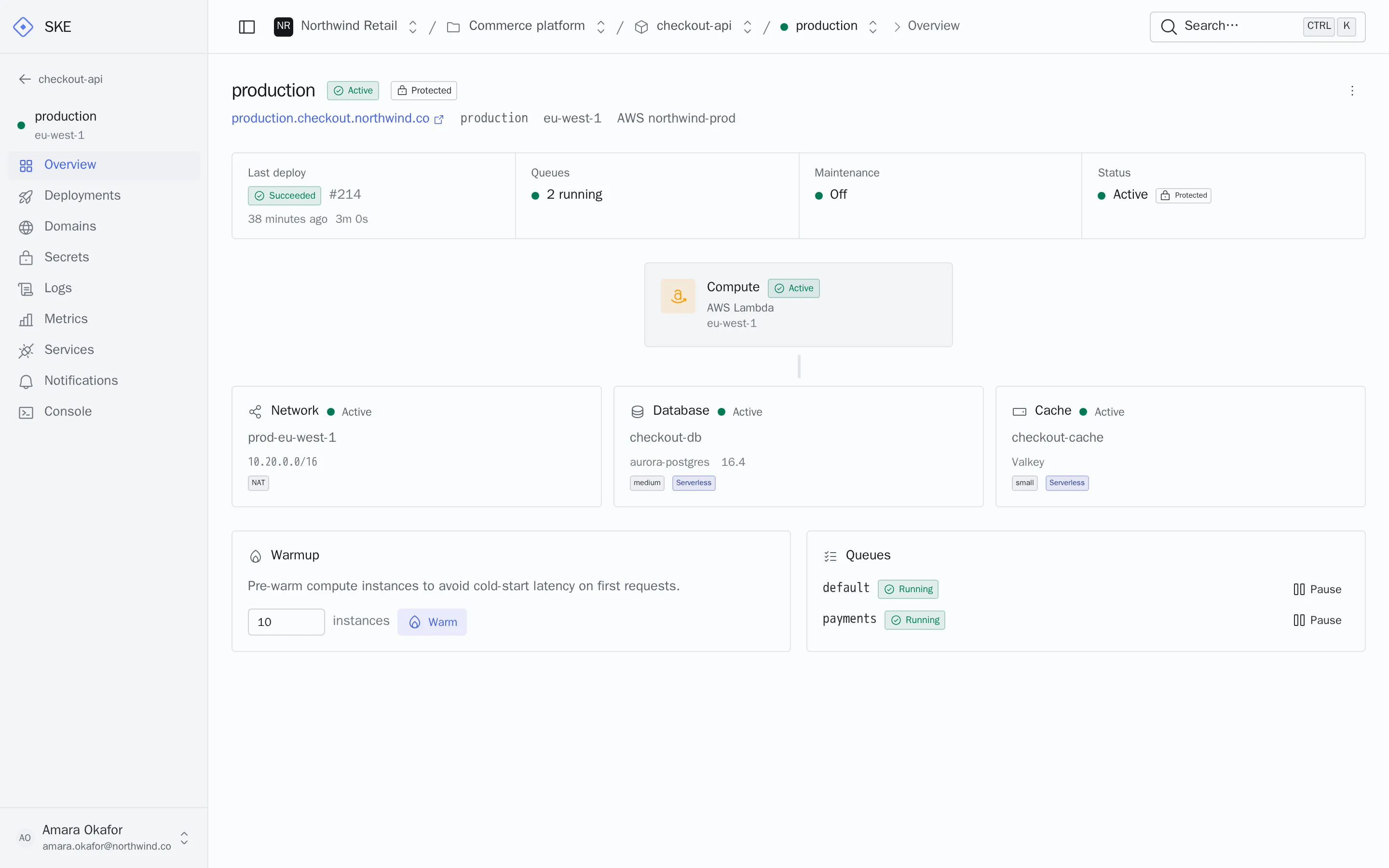
The SKE dashboard showing a protected production environment: last deployment, running queues, and the Lambda function, network, database and cache it uses in the customer's AWS account.

Data boundary

Your data stays in your cloud. SKE only orchestrates.

Resources are created in accounts your organization owns, in the regions you pick for each environment. Your existing controls, guardrails and compliance scope keep applying.

Read the security overview

Your AWS account or GCP project

  • Functions and containers
  • Databases and caches
  • Queues and schedules
  • Networks and subnets
  • Secrets and certificates
  • Logs, metrics and the invoice

What SKE stores

  • Project and environment configuration
  • Deployment history
  • Roles and access policies
  • Audit events
  • Your cloud credentials, encrypted

Decide who can ship to production, down to one environment.

Roles at four levels
Grant access to the organization, a workspace, a project or a single environment.
Custom roles
Build roles from granular permissions, like deploying without managing secrets.
Protected environments
Production deploys need their own permission and an explicit confirmation.
Scoped API tokens
Tokens for CI never exceed their creator's access and expire within a year.
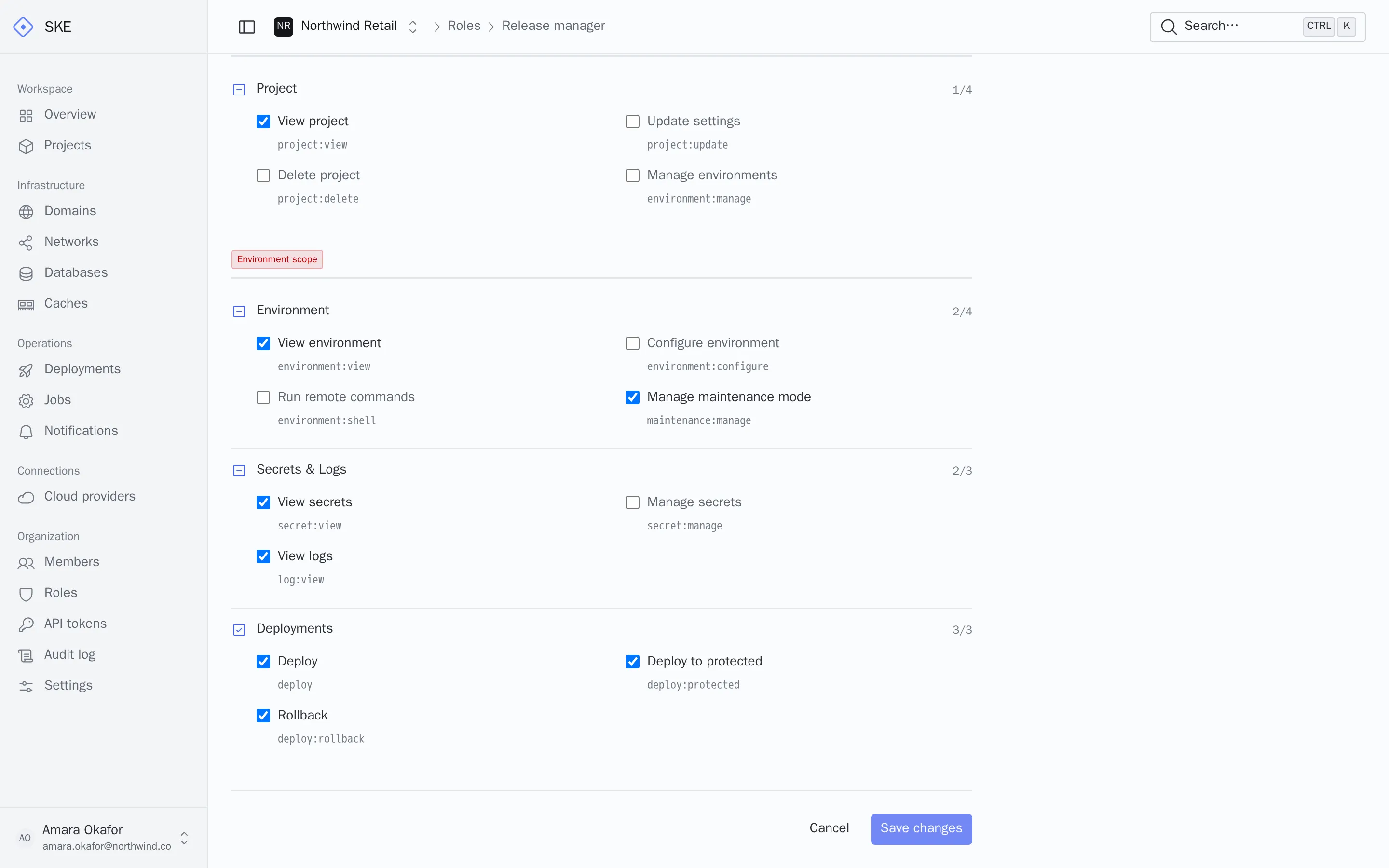
Editing a custom Release manager role in SKE: environment, secrets, logs and deployment permissions are selected, including deploying to protected environments.

A complete record of who changed what.

Deployments, environment settings, roles, cloud connections and infrastructure changes are written to one organization-wide audit log.

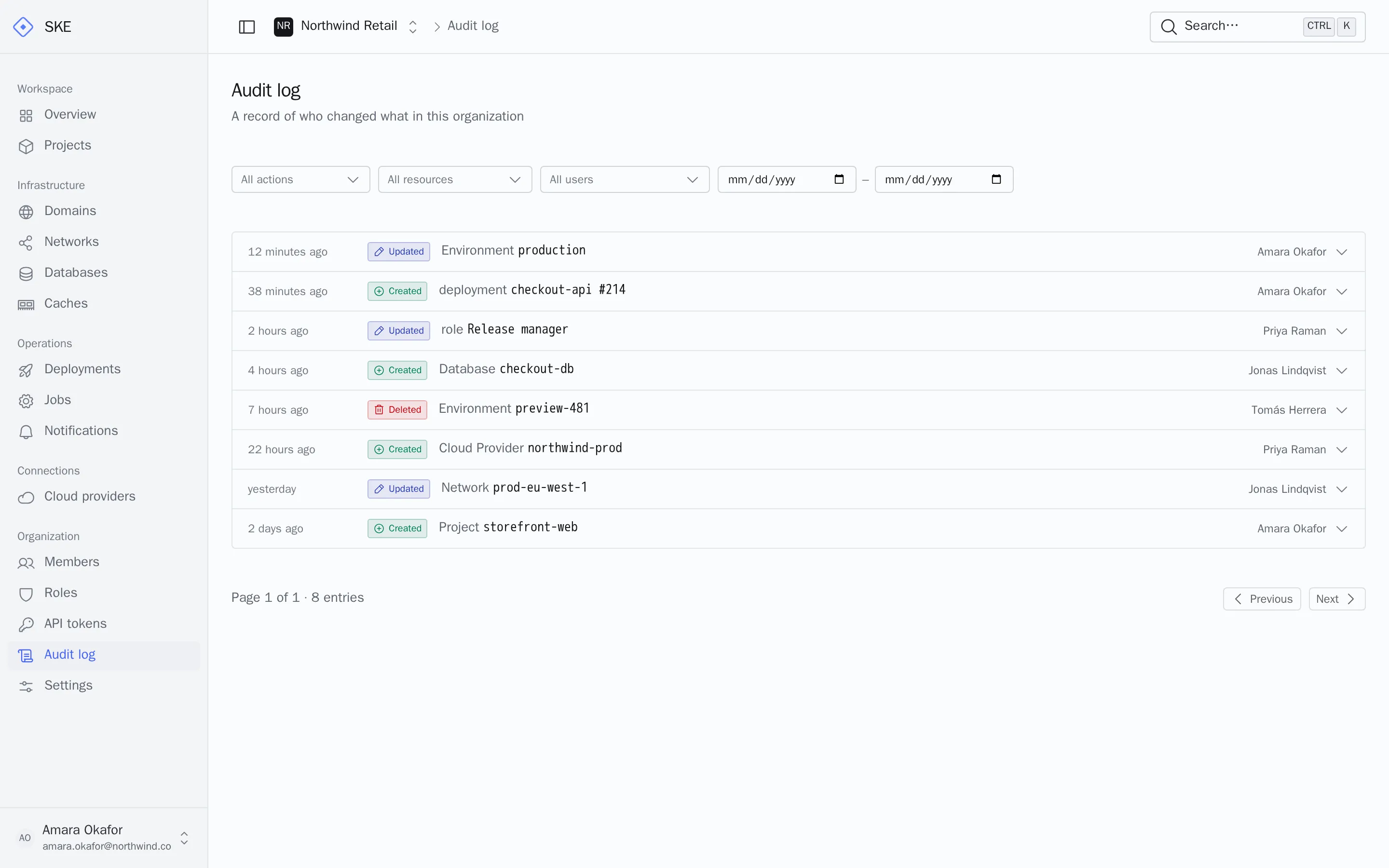
The SKE audit log listing recent changes: a production environment marked protected, a deployment, an updated role, a new database and a deleted preview environment, each with the person who made it.
Before and after
Each entry keeps the changed values, so reviews do not depend on memory.
Who and from where
The person, the request method and the source IP are recorded with every change.
Filter in seconds
Narrow by action, resource, person or date range when an auditor asks.

Your cloud bill, with your discounts, and no markup.

You pay AWS or Google directly.

Usage lands on the invoice you already reconcile, so enterprise agreements, committed-use discounts and credits keep applying. SKE never resells compute.

Cost reports, budgets and alerts in your cloud console keep working as they do today.

Idle environments cost close to nothing

Lambda and Cloud Run scale to zero, so staging and preview environments stop billing compute when nobody uses them.

Chargeback by design

Give each team or client its own workspace and cloud account, and every cost line already has an owner.

Platform

What every production service needs, provisioned for you.

Immutable releases with instant rollback

Every build is an image in your registry. Rolling back points traffic at a previous release, without rebuilding.

$ ske rollback --to <deployment-id>

Secrets in your vault

Stored in SSM Parameter Store or Secret Manager, injected when the app starts. Never in the repository.

Private networking

A VPC per network with private subnets and NAT. Databases and caches are not reachable from the internet.

Managed data services

RDS or Aurora, Cloud SQL, ElastiCache or Memorystore, sized per environment.

Queues and schedules

Workers on SQS or Cloud Tasks, schedules on EventBridge or Cloud Scheduler. No servers to patch.

Day-two operations from one place

Logs, metrics, queue pause and resume, warmup, maintenance mode and remote commands, from the dashboard or the API.

See the full platform

One way to run services across clouds, backends and frontends.

Clouds

  • Amazon Web Services
  • Google CloudGoogle CloudEarly access

Backends

  • LaravelLaravel
  • Ruby on RailsRuby on RailsEarly access

Frontends, static or server-rendered

  • Next.jsNext.jsEarly access
  • NuxtNuxtEarly access
  • AstroAstroEarly access
  • ViteViteEarly access

Early access features are enabled per organization. Ask to join.

Adopt it one team at a time.

No migration project. Each service moves when its team is ready, and nothing leaves your accounts.

  1. 1

    Pilot

    Connect one cloud account to a workspace and move a single service. Your security team reviews the IAM role before anything runs.

  2. 2

    Standardize

    Define roles for developers, release managers and auditors. Protect production, and route deployment alerts to Slack, Teams or email.

  3. 3

    Scale

    Add a workspace per team or client, each with its own cloud accounts. CI pipelines deploy with scoped, expiring tokens.

Questions security and platform teams ask

Where does our application data live?
In your AWS account or GCP project, in the region you choose for each environment. SKE keeps configuration, deployment history, access policies and audit events.
How does SKE access our cloud?
On AWS, through an IAM role you create, assumed with an external ID. On GCP, through a service account key you issue. Revoking either stops SKE immediately.
Can we limit who deploys to production?
Yes. Mark an environment as protected and only people or tokens holding the protected-deploy permission can ship to it, after an explicit confirmation.
What happens if we stop using SKE?
Your functions, databases, buckets and images stay in your account. Nothing is migrated out, because nothing was ever moved in.
Who pays the cloud provider?
You do, directly. Resources appear on your own invoice, so your negotiated discounts and credits apply.
Does it fit our CI/CD pipelines?
The CLI is a single binary. Create an API token scoped to one project or environment and run deploys from any pipeline.

Bring serverless to your platform, on your terms.

Tell us about your cloud setup and the services you want to move. We will walk your team through a pilot in your own account.